You’ve probably noticed how rapidly laptop technology evolves, and keeping up can be a challenge. Whether you’re in the market for a high-powered gaming machine, a sturdy laptop for school, or just something that won’t die after a few hours off the charger, knowing what’s under the hood makes all the difference. With advancements in SSD technology and processors moving faster than ever, it’s essential to stay informed. Next, we’ll explore what these innovations mean for your next purchase and how they can transform your computing experience. But first, let’s consider what matters when choosing the right laptop for your needs.
Choosing the Right Processor
When picking a laptop, the processor serves as the heart of the machine, determining performance across various applications. You’ll find that choosing the right CPU is fundamental, particularly if you’re juggling demanding tasks that aren’t gaming, such as video editing, 3D rendering, or complex data computations.
The processor’s performance largely depends on its core count and clock speed. More cores enable your laptop to handle multiple tasks simultaneously, improving multitasking and speeding up performance-intensive software operations.
Meanwhile, higher clock speeds boost the execution rate of each core, which is crucial for programs that rely on single-thread performance.
It’s also important to take into account the CPU’s thermal design power (TDP), which influences both system heat output and battery life. Processors with a lower TDP typically generate less heat and consume less power, enhancing battery longevity but potentially reducing performance under heavy loads.
Intel and AMD are the leading contenders in the laptop CPU market. Intel’s Core series offers strong hyper-threading technology for superior multitasking, while AMD’s Ryzen processors provide high core counts and excellent integrated graphics performance — a handy feature for tasks involving visual content but not specifically gaming.
Carefully assess these factors to find a processor that aligns with your specific needs and workflow requirements.
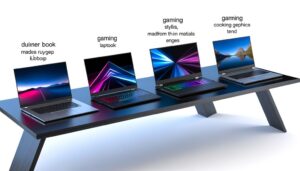
Best Laptops for Gaming
If you’re diving into the world of gaming laptops, selecting the right model can significantly enhance your gaming experience. It’s essential to take into account the GPU, CPU, and RAM, as these components are pivotal in determining your system’s performance.
Starting with the GPU, you’ll want one that can handle the latest games at high settings. NVIDIA’s GeForce RTX series and AMD’s Radeon RX series are top choices, offering potent ray tracing capabilities and AI-driven performance enhancements.
For the CPU, a multi-core processor like AMD Ryzen 4000 series or Intel’s i7 or i9 will guarantee that you’re not bottlenecked during intense gaming sessions.
RAM is another crucial aspect. Opt for at least 16GB for fluid multitasking and seamless gameplay. Some high-end models offer up to 32GB, which can be advantageous for future-proofing your purchase.
Storage also plays a role in how quickly games load. An SSD, preferably NVMe, with at least 512GB of space, is ideal. This setup reduces load times dramatically compared to traditional hard drives.
Lastly, ensure the display. A higher refresh rate, at least 144Hz, and a minimal response time will provide smoother and more responsive gameplay.

Laptop Battery Life Tips
Maximizing your laptop’s battery life is crucial, especially if you rely on your device for long hours away from a power source. Understanding how to sustain battery longevity can save you from frequent replacements and guarantee your laptop remains operational when you need it most.
Firstly, note that excessive heat degrades battery health. Avoid using your laptop on soft surfaces like beds or sofas, which can block ventilation. Instead, opt for a hard, flat surface. Also, consider adjusting your device’s power settings. Enabling the ‘Power Saver’ mode can greatly extend your battery life by reducing screen brightness and limiting background activity.
Secondly, you should regularly check your battery’s condition. Most operating systems include a tool to generate reports on battery health and suggest optimizations. By being proactive, you can replace your battery before it fails, thereby avoiding unexpected disruptions.
Lastly, minimize unnecessary peripheral usage. External devices like USB drives and mice draw power from your laptop. Disconnect these when not in use to conserve battery.
The Latest in SSD Technology
In the computing sphere, solid-state drives (SSDs) are constantly evolving, providing faster speeds and increased dependability over traditional hard disk drives (HDDs). As you explore the latest advancements, you’ll discover that manufacturers are pushing the limits of NAND technology and the interfaces through which these drives connect.
Industry leaders are now implementing 3D NAND technology, which stacks memory cells vertically, significantly boosting storage density and efficiency. This innovation isn’t just about packing more data into a smaller space; it also enhances the endurance and performance of SSDs, which are essential for tasks that require high-speed data access.
Furthermore, the transition from SATA interfaces to NVMe (Non-Volatile Memory Express) signifies a notable leap. NVMe utilizes the high-speed PCIe (Peripheral Component Interconnect Express) bus instead of the older SATA interface, which greatly reduces data transfer bottlenecks.
For you, this means faster boot times, faster file transfers, and system responsiveness, enhancing your computing experience.
As SSDs continue to develop, they’re becoming more affordable while offering significant benefits in terms of speed, durability, and efficiency. It’s an exciting time to upgrade or invest in new technology that ensures your system is resilient and future-ready.
Understanding Graphics Cards
Understanding graphics cards is crucial for optimizing your computer’s visual performance, especially in graphically intense tasks like gaming or video editing. Graphics cards, or GPUs, are pivotal in rendering images, video, and animations on your screen. They work by converting data into signals your monitor can display, using their own dedicated RAM and processing power to handle complex visuals more efficiently than your computer’s main CPU.
You’re likely aware that GPUs come in two types: integrated and discrete. Integrated GPUs are built into the processor and share memory with the CPU, making them suitable for everyday tasks but generally inadequate for high-end gaming or professional 3D applications. Discrete GPUs, conversely, are separate units with their own memory and higher processing capabilities, designed for intense graphical computations.
When you’re choosing a GPU, consider the core count, clock speed, memory type, and memory bandwidth, as these factors directly influence performance. Higher core counts and faster speeds result in smoother and more detailed graphics.
Memory type and bandwidth determine how quickly the GPU can access data needed for rendering images. Balancing these specifications with your specific needs and budget will help you make the most informed decision.
Top Laptops for Students
While discussing graphics cards emphasizes the significance of GPU performance for demanding tasks, students often prioritize a balance of functionality, portability, and affordability in their laptops. You’ll find that not all laptops are suited to every student’s needs or budget.
For example, if you’re pursuing a degree in digital arts or engineering, you’ll need a laptop with a sturdy processor and sufficient RAM to handle software requirements efficiently.
The Microsoft Surface Laptop is ideal for those who need a portable yet powerful option. It offers a high-resolution display and a long battery life, which are crucial for long hours of lectures and study sessions.
Conversely, the MacBook Air remains a favorite among students for its seamless integration with other Apple devices and its reliability in handling multiple applications simultaneously.
For those on a tighter budget, the Acer Aspire 5 provides a solid performance at a more affordable price point. It doesn’t skimp on the necessary features either; it features a decent processor and a full HD display, ensuring you don’t miss out on quality while saving money.
Choosing the right laptop as a student means weighing these factors carefully, ensuring you invest in a tool that will enhance your educational experience without breaking the bank.
Durability and Design Features
Considering durability and design features in laptops is important, especially for students who are constantly on the move. You’ll find that the materials used in construction—such as aluminum, magnesium alloys, or carbon fiber—significantly impact a laptop’s resilience and weight. Aluminum, for instance, balances weight and sturdiness, making it a popular choice for premium models. You must understand the trade-offs between durability and portability.
Another significant aspect is the design of the hinges. You should look for laptops with sturdy hinge mechanisms that can withstand frequent opening and closing. This feature is often overlooked but can determine the longevity of your device.
Moreover, the keyboard’s build quality also plays a significant role. Keyboards with backlit keys and spill-resistant designs provide added durability against accidental damage, a common issue for students.
Lastly, pay attention to the overall engineering of the chassis. A unibody design, where the chassis is made from a single piece of material, often yields a stronger laptop. Such design considerations not only enhance durability but also affect the aesthetic and tactile feel of the laptop, which can influence your daily experience. Analyzing these features helps you make an informed decision tailored to your needs.

Budget-Friendly Laptop Options
Shifting focus to budget-friendly laptop options, and evaluating which models provide the best value without compromising too much on performance and durability is important. You’ll find that several brands have honed in on creating cost-effective laptops that meet everyday needs without breaking the bank.
First, consider the processors. You don’t need the latest Intel i9 or Ryzen 9 for basic tasks. Look for laptops with Intel i3 or Ryzen 3 processors; they’re sufficient for web browsing, office work, and streaming.
Also, opting for models with at least 8GB of RAM guarantees smoother multitasking.
Storage is another key factor. Solid State Drives (SSDs) are preferable due to their speed over Hard Disk Drives (HDDs). Many budget laptops now offer 256GB SSDs, which provide ample space for most users while enhancing overall performance.
Screen quality is important, even in cheaper models. Aim for Full HD (1920×1080) displays for clearer images and better viewing experiences.
Lastly, don’t overlook build quality and battery life. Durable designs and longer-lasting batteries are vital for longevity, especially if you’re often on the move. Brands like Acer, ASUS, and Lenovo often provide the best mix of these features in their budget ranges.
Conclusion
You’ve explored the key elements that make up a top-performing laptop, from cutting-edge processors to resilient SSDs and potent graphics cards. Whether you’re a student, gamer, or everyday user, understanding these components helps you make an informed choice that aligns with your needs and budget. Keep these insights in mind to optimize your laptop’s performance and durability without compromising on style or breaking the bank. Remember, the right laptop can greatly enhance your computing experience.